Tax returns
Tiny Tally works out your return from the tax codes on your transactions, invoices and bills. Check the figures, then copy them into your tax office's site or send them to your accountant. Tiny Tally doesn't lodge anything for you.
Find it in Reports. Only your own country's return is shown.
BAS & GST shows the BAS for a quarter, a month or a year, depending on how you report (set in Settings). Quarterly is Simpler BAS: G1, 1A and 1B. Monthly reporters get the full set of labels.
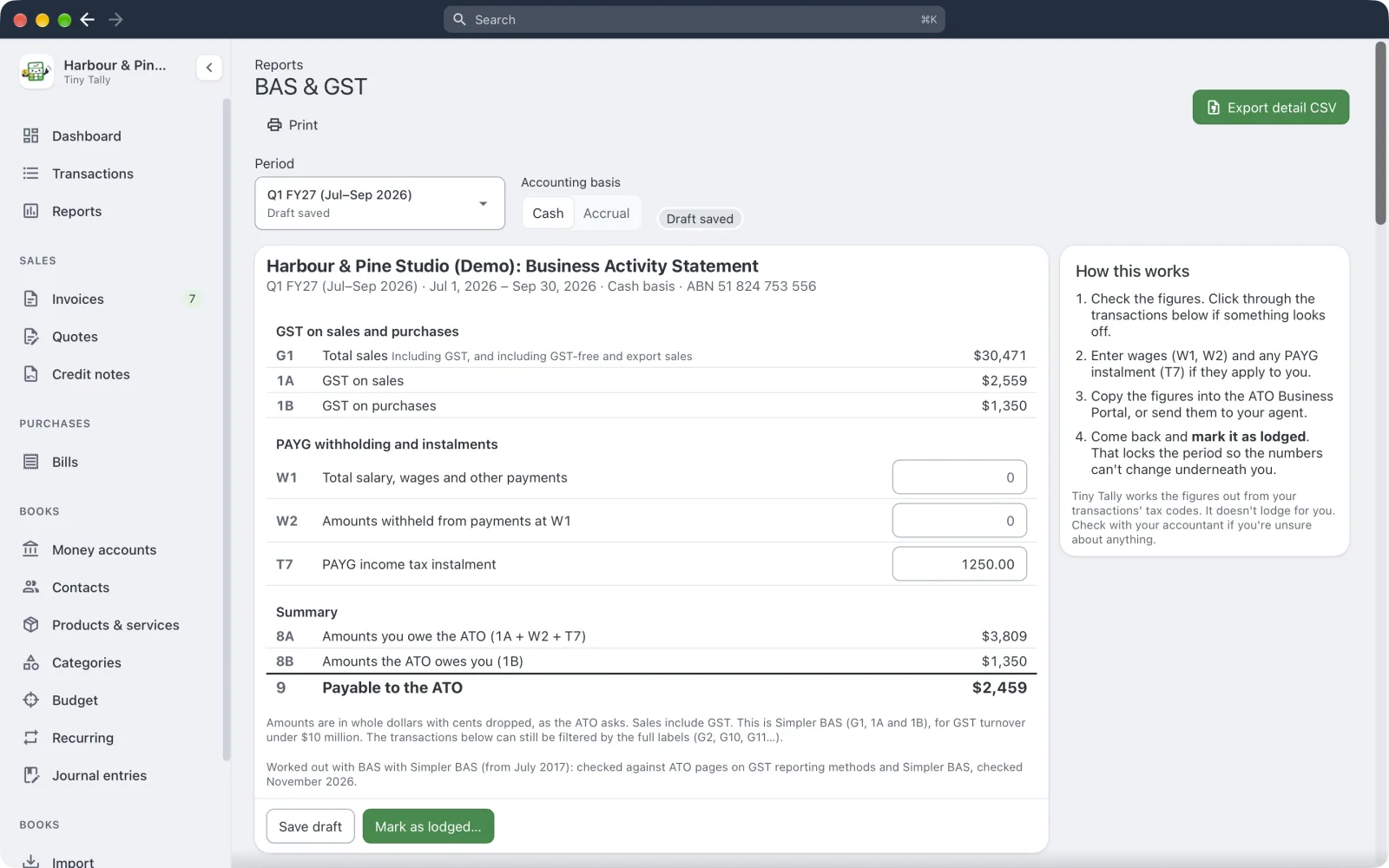 A BAS worked out from the demo books
Fill in wages (W1, W2) and any PAYG instalment (T7) if they apply. Switch between Cash and Accrual accounting. Add GST adjustments for anything that needs one.
Drafts, lodging and locking
For a BAS or GST return:
- Save draft keeps the figures you've entered while you check.
- After the period has ended, Mark as lodged… once you've lodged it. This locks every transaction and invoice up to the end of the period, so the figures you reported can't change.
- Record payment (or Record the refund) when the money moves.
Found a mistake? Reopen to amend unlocks it.
Transactions in this period lists everything behind the figures, and History shows past returns.
The rules change
Tiny Tally's tax figures are checked against the tax office's published guidance, and each return says when it was last checked. If you're unsure about anything, ask your accountant.